
New! More ways to keep your Multi Me account secure 🔐
We've made some improvements to Multi Me's security settings, giving you more ways to protect your account and manage where you're signed in.
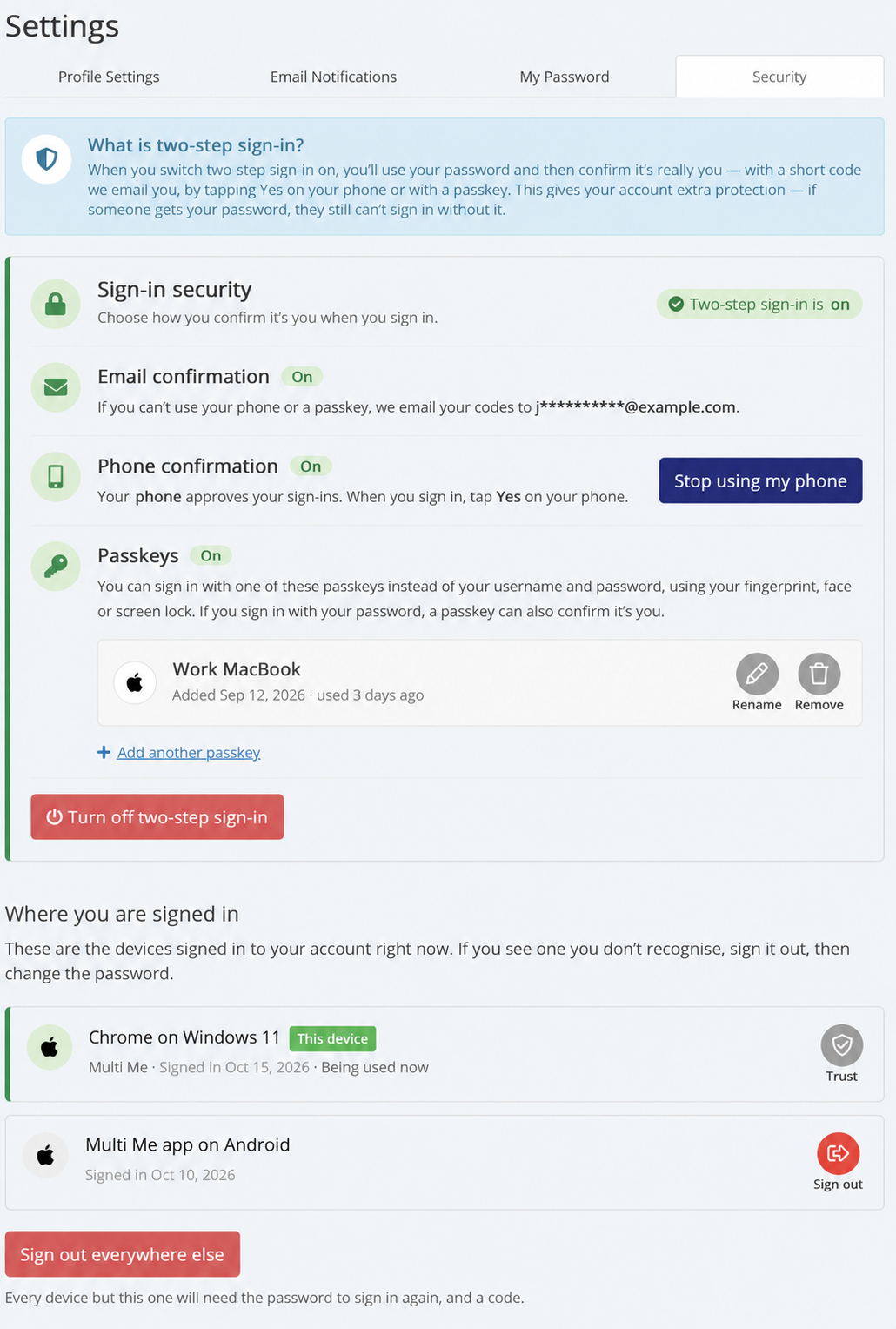
You can now manage your sign-in security in one place, with options that make signing in both safer and easier.
What's new?
🔐 Two-step sign-in
Two-step sign-in adds extra protection to your account. As well as your password, you can confirm it's really you using a code sent by email, your phone or a passkey.
📱 Confirm sign-ins using your phone
You can approve sign-ins directly from your phone, making it easier to access Multi Me securely.
🔑 Sign in with a passkey
Passkeys let you use your fingerprint, Face ID or device screen lock to sign in, without needing to remember another password.
💻 See where you're signed in
The new Where you are signed in section shows the phones, tablets and computers signed in to your Multi Me account.
You can:
See which devices are signed in.
Sign out of devices you no longer use.
Choose Sign out everywhere else to sign out of all your other devices.
You're in control
These improvements help you keep your account secure and give you more control over how you sign in.
To explore the new settings, simply go to:
Settings → Security
Your privacy and security are important to us. We'll continue improving Multi Me to help everyone use the platform safely and confidently.
